Stripe payment links not set for: — edit assets/config.js. (This warning only shows on localhost.)
Recovered.org.au

Welcome backYou've already bought a guide.

Australian · Facebook, Instagram & Threads · Edition 1

Getting your account back

Meta disabled your account, gave you no reason, and there is no one to ring. These guides walk you through it in plain English — and write your appeal for you, inside Meta's 500 character limit.

General information only · Not legal advice · Not affiliated with Meta

Screenprint-style illustration of a phone with a blank screen struck through by a diagonal band.
01

What is actually happening

You are not arguing with a person

Meta has far more accounts than any team could check, so software makes the first decision — and usually the first decision about your appeal too. That explains nearly every frustrating thing about this.

The notice rarely says what you did. A rejection that lands within minutes means nobody read it. And if your Facebook, Instagram and Threads accounts sit in the same Accounts Centre, one decision takes out all of them on the same day.

01

No reason given

You're told you breached the Community Standards, without being shown the post, message or behaviour they mean.

02

A bot reviews the bot

When software reviews its own decision it tends to agree with itself. That's why appeals come back rejected in minutes.

03

About 30 days

Meta usually holds a disabled account for around 30 days before deletion becomes permanent. Some of this expires.

What these guides will not do

Nobody can guarantee you get your account back — and anyone who does is running a scam. Meta's terms are written so access is never guaranteed. What a good submission buys you is a genuine chance at human attention on a case that software has been closing automatically.

02

Choose your situation

Which account was disabled?

The two guides overlap, but the routes are genuinely different. Pick the one that matches what the account was actually being used for.

Personal AUD$15

Your own Facebook, Instagram or Threads

Photos, friends, groups, messages. The account is yours, not a business asset.

  • The first hour, while the evidence still exists
  • Work out which of the six bans you actually have — the wrong form goes nowhere
  • Fill in a short form and it writes your appeal, counted against Meta's 500 character limit
  • Six escalation routes in order, with what each needs and how long it takes
  • Evidence checklist and a dispute log that saves as you go
  • How to spot a recovery scam before it takes your ID
Get the personal guide

Instant access · Secure checkout by Stripe

Business AUD$20

A Page, business Instagram, ad account or Business Manager

Everything in the personal guide, plus the route personal users cannot use.

  • The free Australian Small Business Ombudsman dispute, field by field
  • A calculator that works out what the ban is costing you, with the wording to justify it
  • Every written field on the Ombudsman form, generated and already stripped of the characters their portal rejects
  • The follow-up email, the notice to your customers, and your supporting statement
  • Meta's business-only channels, including the one that gives a real case number
  • ACCC, OAIC, eSafety and the Oversight Board — what each is actually worth
Get the business guide

Instant access · Secure checkout by Stripe

Not sure which one?

If the account carries your trade, takes enquiries, or runs your ads, take the business guide — the Ombudsman route is only open to a commercial dispute, and it is the most valuable thing in either guide. If it's your own account, the personal guide covers everything you need.

03

What you actually get

Not a PDF you read once

Each guide is a single web page you keep. It works offline, prints properly, and remembers what you've filled in.

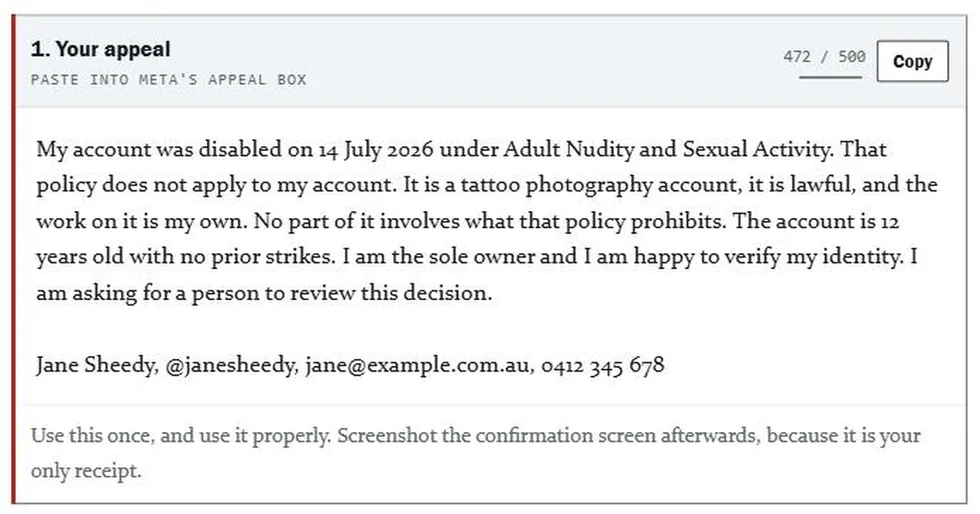
The guide's appeal writer, showing generated wording and a live counter reading 472 of 500 characters.
Fill in the form once — it writes the appeal and counts it against Meta's limit
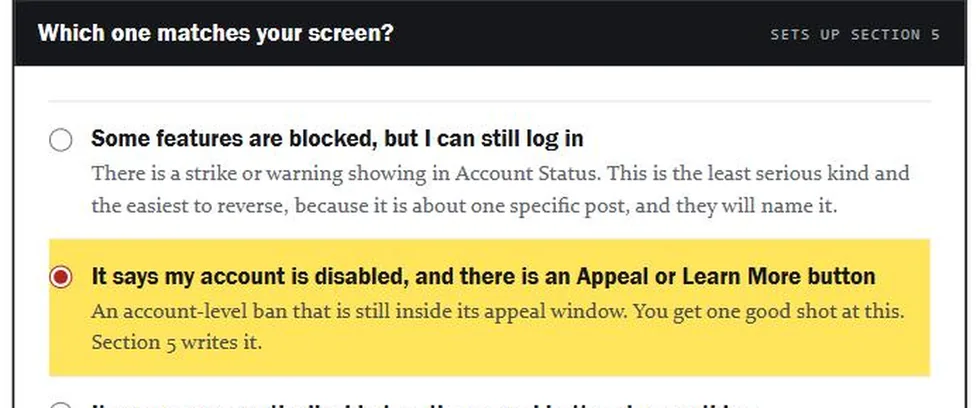
The guide's ban type picker, with the matching option highlighted in yellow.
Six kinds of ban, six different routes. Using the wrong one wastes an attempt
01

It writes the words

Your appeal, a second attempt, a request for a written reason, and a dated timeline. Copy each one straight into the box it belongs in.

02

Nothing leaves your device

Everything you type is saved in your own browser and nowhere else. There is no account, and no server holding your details.

03

Yours to keep

One self-contained file. Save it, print it, or take it to a lawyer. It keeps working if this site ever goes away.

04

Where you stand

What this is, and what it isn't

Independent

Not affiliated with, endorsed by, or connected to Meta Platforms, or to the Australian Small Business and Family Enterprise Ombudsman.

General information

These guides describe a process. They are not legal advice about your particular situation, and no outcome is guaranteed.

Written for Australia

Australian contacts, Australian regulators and the ASBFEO route. Most of the Meta process applies anywhere.

05

Before you buy

Fair questions

Will this get my account back?

Nobody can promise that, and you should be sceptical of anyone who does. Meta's terms are written so access to the platform is never guaranteed. What these guides do is make sure your submission is the strongest and best-evidenced version it can be, sent through the right channel, in the right order — which is the part you actually control.

Why not just write the appeal myself?

You absolutely can, and the guide tells you how rather than doing it behind a curtain. What it saves you is the research: which of the six ban types you have, which channel matches it, what to say and what to never say, and how to fit it into 500 characters. Most failed appeals fail on route or wording, not effort.

My account was disabled weeks ago. Is it too late?

Possibly not, but time matters. Meta typically holds a disabled account for around 30 days before deletion becomes permanent, and some steps — downloading your data, capturing the notice — stop being possible once that window closes. The guide is ordered so the things that expire come first.

What's the difference between the two guides?

The business guide contains everything in the personal one, plus the Ombudsman route: a free Commonwealth office that assists small businesses in dispute with other businesses. It also adds the loss calculator, the business verification channel, and the supporting statement. If the account was commercial, that route is only open to you.

Can I get a refund?

Yes. If the guide isn't what you expected, email and you'll get your money back. Australian Consumer Law guarantees apply regardless of what any policy says.

Do you need my Facebook login?

No, and never give it to anyone who asks. These are guides you work through yourself. There is no login, no account on this site, and nothing you type into the guide ever leaves your own browser.